Do your products already have a barcode, like the jars you sell at the supermarket or the deli? Now customers build their order by scanning that barcode with the phone's camera, inside your own site.
How it works
- Under the products, next to Fazer pedido (place an order), the customer taps Escanear código de barras (scan a barcode). The button is also at the top of the order screen.
- The camera opens inside the site. The first time, the phone asks whether the site may use the camera.
- They point it at the barcode, about a hand's width away, and the product goes into the order straight away. The site shows it, with its photo, size, price and how many are in the order.
- Escanear mais (scan more) keeps the camera going: another product, or the same one again for one more. Ver o pedido (see the order) opens the order with the product marked, to send on WhatsApp as always.
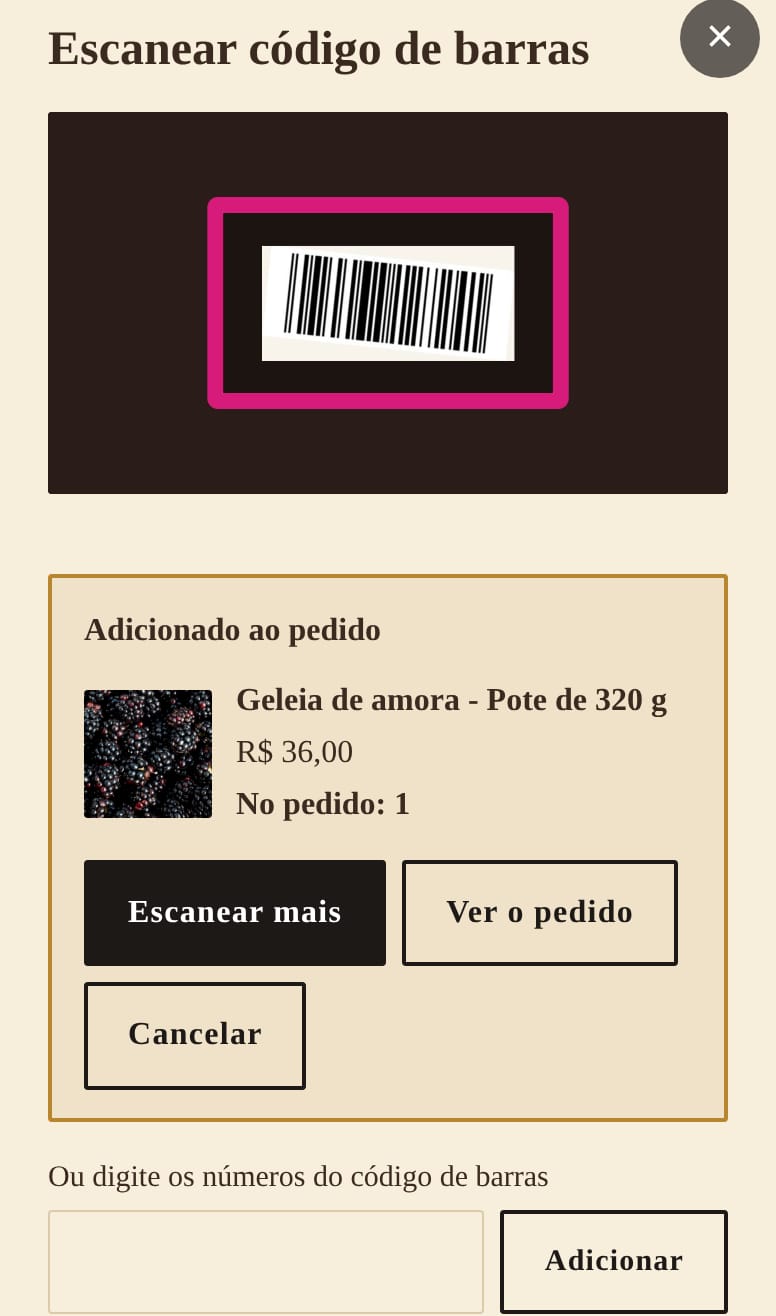
- Scanned the wrong product? Cancelar (cancel) takes it out of the order and goes back to the camera.
- A jar held in front of the camera counts once. For one more, move it away and scan again.
- Camera didn't open? They can type the numbers under the barcode.
- The camera picture and the number read stay on the customer's phone: nothing is stored or sent.
- It works on iPhone and Android, in the browser, without installing any app.
Who it's for
For anyone whose products already have barcodes: producers who sell in supermarkets and delis, shops and stationers. A customer who bought your jar at the supermarket scans it at home and orders again directly from you, or tries another flavour.
No barcodes on your products? Use a QR code on the label, which does the same: see cards and stickers with QR codes.
How to switch it on
It's part of the online order, at no extra cost. Send me on WhatsApp the barcode number of each product (and each size, which usually has its own) and I'll switch it on for you: message me. See the button in the order of the example jam site.