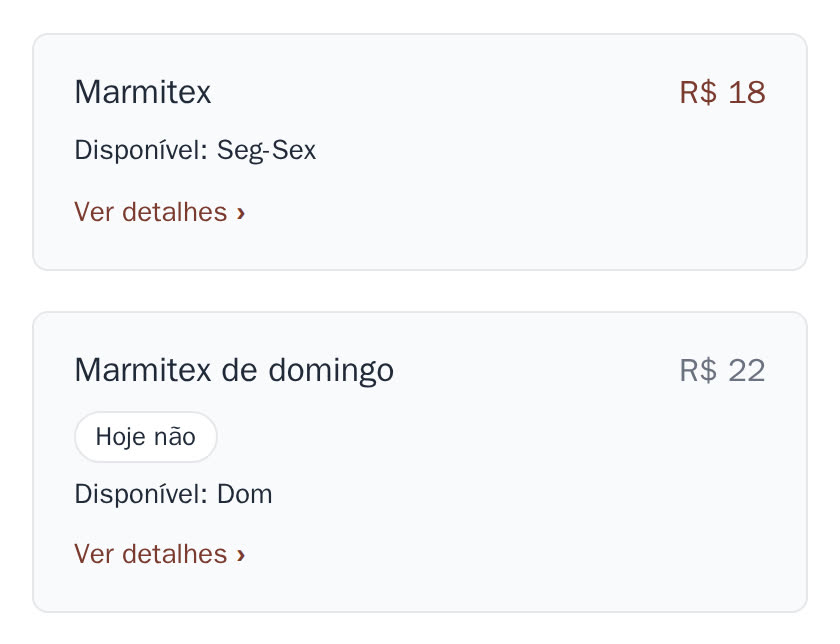
Is the lunch box more expensive on Sunday? Is the feijoada only on Wednesdays? Does the Christmas dinner only show in December? In the editor you say on which days or dates an item is on sale, and the site takes care of the rest by itself.
- Weekdays: the item shows "Available: Mon-Fri" or "Available: Sun". For a different Sunday price, make two items, each with its own days and prices.
- Dates: the item appears from one day and goes away after another, like a Christmas dish.
- Outside those days, you choose: the item leaves the site, or stays in grey with the label Not today (or Sold out, after the last date), so customers see you have it.
- With online ordering, the item can only be ordered on the right days. An order sent just before still works.
It is part of the site, at no extra cost. You change it in the editor, which is part of the monthly plan.
How to do it in the editor
- In the menu (Cardápio), tap Ver detalhes › on the item.
- Under Dias à venda, tap the days it is sold (Seg, Ter, ...). None ticked = every day.
- Only for a period? Fill in A partir de (from) and/or Até (until).
- Choose what happens outside those days: switch it on to show it in grey, or leave it off to hide it.
- Tap Publicar. It is on the site within a few minutes.
For a Sunday price: add an item with + Adicionar item, name it e.g. "Marmita de domingo", enter the Sunday prices and tick only Dom. On the usual item, tick the other days.
Try it in the demo editor: nothing goes live.